In praise of the single-threaded agent loop
An incomplete list of things I don’t get about graph engineering:
- Agents dynamically writing prompts for other agents
- Agents writing durable plans that don’t actually work
- Fanning out interconnected work to subagents when it could run serialized and still be ready by tomorrow
- Paying for the extra tokens that all the orchestration and coordination overhead adds1
I don’t doubt that something like graph engineering–orchestrator agents spawning subagents, wiring them into DAGs, everything racing along in parallel–is the future. I just don’t see the point in rushing to live in the future before it is actually better than what we have today. I get that this will be a well-worn path someday, and the advantages will be worth it. Until then, it strikes me as complexity porn.
Don’t get me wrong, I’ve had plenty of success with subagents inside Claude Code for taking on the largest tasks in a project. And I’ve had plenty of success running agents in a loop to complete whole projects autonomously. However, before the tooling is prime time, why would you inflict the pain of running both in combination on yourself?
People say this works:
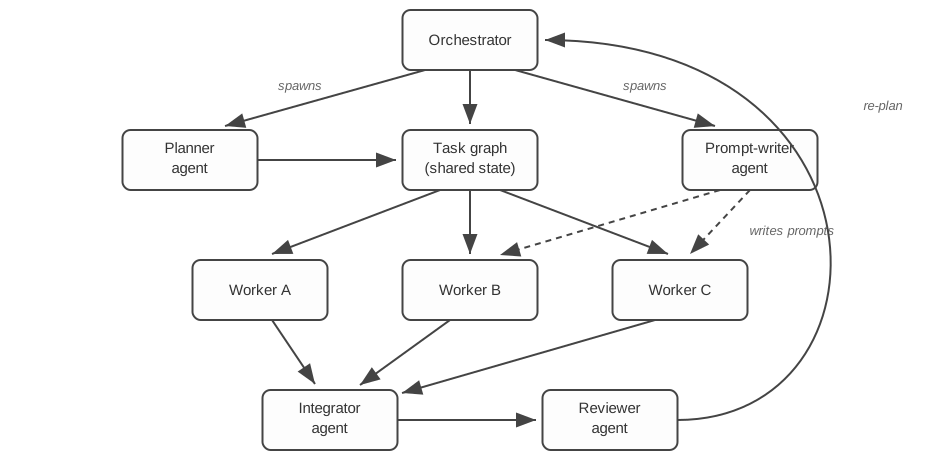
My question: why do all that, when you can do this?
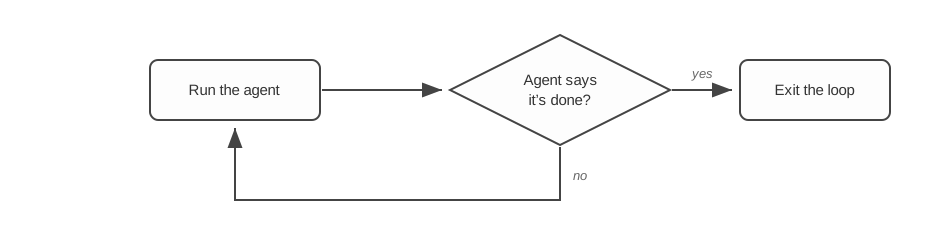
Well… a loop plus a scheduler
In practice, my loops are a little more complicated than that diagram. Like with graph engineering, a serialized loop can make use of different agent roles.2 The roles I use: Worker, Reviewer, and Coach.
| Role | Responsible for | Model choice |
|---|---|---|
| Worker | Implementing changes; signaling when the work is done | The cheapest model I can get away with |
| Reviewer | Checking over the workers’ changes | A different model family from the worker |
| Coach | Keeping tabs on the loop itself | A smarter model than the worker |
The scheduler has one job: make sure the loop runs the non-worker roles from time to time.
The reviewer needs to trigger after the last code change (more on that below). You may also want to schedule it at a regular cadence during the loop, to review smaller chunks of work and catch problems earlier. Consider batching worker changes for review–running a review agent after every iteration gets expensive. As for model choice, conventional wisdom says to pick a different model family from the worker, so the two round out each other’s biases.
The coach is the meta-process that keeps tabs on the loop. The coach writes a GUIDANCE.md doc that gets injected into subsequent agent prompts. That’s overhead, sure, but it can easily pay for itself many times over when the coach spots a problem that workers keep tripping over. And when the coach runs on a smarter model, it can help unstick a loop whose workers keep circling the same problem.
What I actually came here to tell you
The whole reason I was motivated to write this post was to share a pattern I have found so, so satisfying. Everything above was just to get you up to speed on the context and, hopefully, to encourage you to put down the complexity porn and give this a try instead.
The secret sauce to making a single-threaded agent loop hum is a well-designed bug tracker.
The mechanics are standard stuff: the reviewer files bugs, and workers are instructed to work down the open bugs before calling the work done. If a bug list was all we needed, we could prompt the agent to maintain a BUGS.md file and call it a day.
However, even with a single-threaded agent loop, there’s still a minor coordination problem left over. We need a safe way for you, the human, to interact with the loop while it is running.
If you set things up right, these loops can run for hours or days. It is unrealistic to think you’ll get all the requirements right up front, or that the agent will get everything exactly the way you want. Sometimes you let the loop run overnight, entirely unsupervised, and check in the next morning to find out whether what you asked for is what you actually wanted. But sometimes you’ll want to revise direction mid-flight, as you see what the agent is building and as the agent gives you feedback (more on that in a minute). You can even pipeline the work: jot down the initial requirements, kick off the loop, then build out the rest of the requirements while the loop runs. That’s the beauty of not writing a plan.
You might not strictly need a bug tracker for this. You could fire up an interactive agent harness and tell it to make changes to the code while the loop is running. I’ve found that while simple, this leads to more trouble than it is worth. Whereas with a bug tracker, you get a clean separation of responsibilities:
| Responsibility | Who does it |
|---|---|
| Editing the project code | Agent loop |
| Editing the requirements docs | Human (via an interactive agent session) |
| Filing a bug | Agent loop or human |
Anything you want done, you achieve by updating the requirements docs or by filing a bug. The loop picks up the work naturally on a future iteration.3 No stepping on each other’s toes, and no agent loop overwriting the changes you just made.
An end to scope creep

The Winchester Mystery House: 38 years of continuous construction, no requirements doc. Photo by The wub, CC BY-SA 4.0.

One of the biggest hurdles I hit when I first let agents run autonomously–reviewing their own work over many, many iterations–was an explosion of scope. A giant waste of tokens, and even more work for me afterward, unwinding all the unnecessary gold plating.
I’m happy to report I’ve hit upon a pattern that’s pretty close to bulletproof. The idea is to split bugs into two types: code bugs and spec bugs. The magic comes from two rules that work together:
- A code bug can only be filed if it cites a specific, named requirement that the code contradicts.
- Workers work from the list of open code bugs, and are forbidden from working on spec bugs.
Any agent is free to file a spec bug when it thinks the requirements are unclear, or when it spots what looks like a problem that the current requirements don’t cover. We give agents an escape valve to report what they’re worried about, in a way that keeps those worries from spiraling into sprawling tasks for the worker.
In practice I find it convenient to introduce one more bug type: the task. Loop agents are forbidden from filing tasks (the bug tracker can enforce this). Tasks are how the human injects work into the loop that would be awkward to squeeze into citable requirements–think UI tweaks or code refactors.
How does the agent know it’s done?
Engine order telegraph, dredge McFarland. Photo by Narsk, CC BY-SA 4.0.

This is a common question from people new to loop engineering. I don’t know if I have the definitive answer, but what I’ve settled on seems to be working.
For some projects I’ve been able to use a deterministic script to decide when the loop is done, and when that’s feasible it works well. Most projects, though, I’ve needed the general intelligence of an agent to make the call. The worker is already responsible for deciding what to work on; we can keep things simple by also making the worker responsible for declaring when the work is done.
The biggest problem I’ve run into is the worker calling things done when there was still plenty of work to do. To combat this, I’ve instituted a few rules:
- A worker either finds work and makes changes, or it calls the work done–never both in the same iteration. That means there’s a whole dedicated iteration for confirming there’s nothing left to do.
- After a worker signals done, the loop always schedules a reviewer iteration, to make sure it doesn’t spot any code bugs in recent changes.
- One worker signaling done is not enough. There must be two consecutive worker iterations that signal done (not counting any reviewer or other iterations in between) before the loop terminates. This last rule might be overkill 🤷 but my terminal worker iterations tend to cost single-digit pennies, so it is not a big deal.
So for a small change that can be one-shotted, this means at least 4 loop iterations:
- Worker #1 runs and implements all the changes
- Worker #2 runs and signals the work is done
- The reviewer runs and finds no bugs
- Worker #3 runs and signals the work is done, again
The loop sees the two consecutive done signals and terminates. Clearly overkill for a change that took a single worker iteration. But it is a tiny amount of overhead for a loop that runs for hours.
How do you deal with agent stalls?

Cranking a stalled car the old way, Worthington, Ohio, 1938. Photo by Ben Shahn for the FSA, public domain.
Sometimes–particularly with the cheap models–an agent will start some work, make a few tool calls, then just… stop. When that happens, the loop simply starts the next iteration. The next worker sees the untracked or uncommitted files and decides what to do with them. It is designed to be self-healing.
More often than model stalls, honestly, I’ve run into agent harness bugs that also lead to a stall. That’s why the loop script should run the agent under a timeout: any agent that runs too long gets terminated, and the next iteration starts. The loop model biases toward recovery.
What bug tracker should I use?
Collection drawer, Bohart Museum of Entomology. Photo by Daderot, CC0.

In theory, any bug tracker works. In practice, I recommend one that cleanly segregates the project (or directory) your loop is working on from everything else. If agents get a whiff of other requirements they could go work on, in my experience they love to jump at the chance.
I vibe coded my own CLI bug tracker, backed by a lightweight SQLite database associated with the current directory. There’s probably something out there that would work just as well–I haven’t bothered to search for it.
Multi-component systems
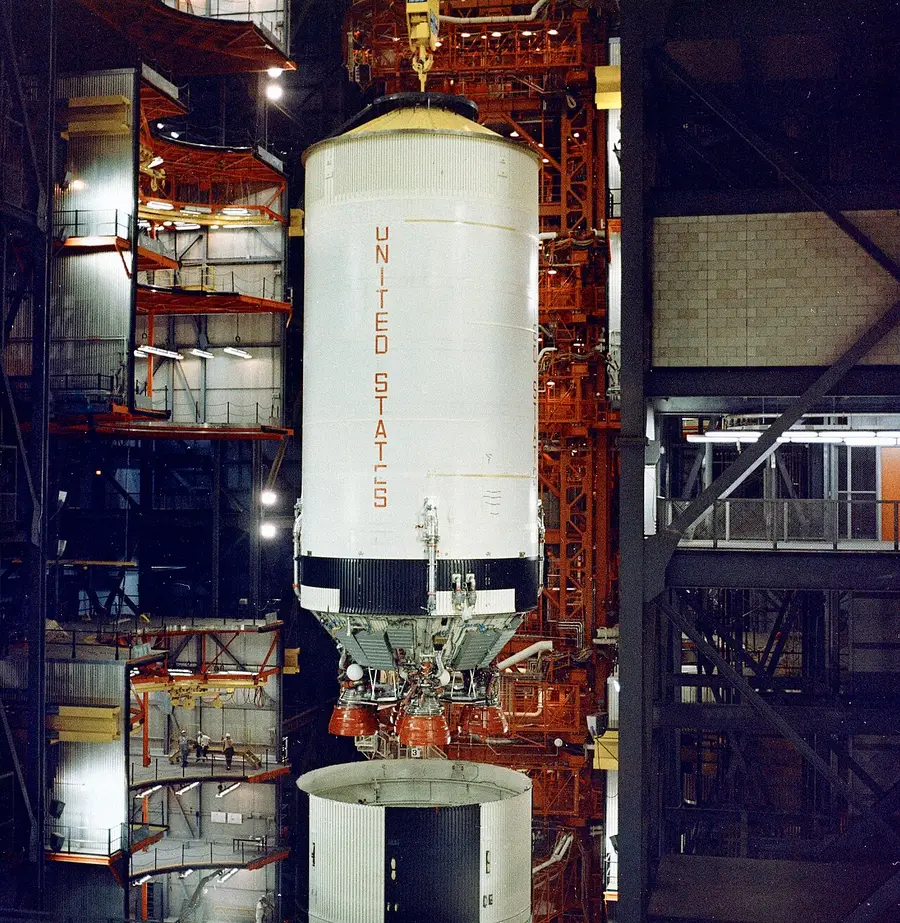
Apollo 6's S-II (North American Aviation) meets its S-IC (Boeing), VAB, 1967. NASA photo, public domain.
I’ll end by foreshadowing the problem space where I think graph engineering wins out in the end: delivering a complete solution composed of large numbers of high-level components. (By “component” I mean something like an app made up of a “backend app” component and a “frontend app” component.)
The single-threaded loop model described in this post is aimed at implementing projects in a single repo, or a subdirectory of one.4
Having said all that, the single-threaded agent loop is still a compelling approach for building multi-component systems. Give each component its own agent loop, responsible for implementing that component’s requirements. Before the work kicks off I work in an interactive agent session to design how the components will fit together. After the agent loops finish building the components, I fire up an interactive agent to integrate and test the changes. Basically, I still insert myself into the process as an engineer–just at the systems-integrator level.
Someday graph engineering will be the boring, well-worn path, and I’ll take it. Until then I’ll be over here with my simple single-threaded loops, shipping projects.
Save your em-dash forensics: this post, too, was AI authored.
See Also
- Your Agent Orchestrator Is Too Clever - Chris Parsons on Ralph loops, the bitter lesson, and why Gas Town is “a series of Ralph loops with extra steps.”
Notes
- I swear, every time I use subagent orchestration on a big problem, it burns way more tokens than I can plausibly explain with orchestration and coordination overhead alone. No idea where it’s all going.
- The specialized systems people are building around agent roles are something to behold: a dedicated cybersecurity reviewer agent, a project-manager agent that writes the plans, and who knows what else–and then type systems introduced to manage the interactions between all of them. Meanwhile, the labs keep shipping very good general-purpose agent models that can, in theory, do everything, so long as the task is well sized. I can’t shake the suspicion that the sophisticated approaches are on the wrong side of the bitter lesson.
- You could even introduce a bug priority field, if you wanted to bump your work over whatever else the agent might pick up next.
- It’s not that you couldn’t apply it to cross-repo changes in theory. It’s that doing so introduces enough challenges that you’d end up bolting a number of epicycles onto the otherwise simple looping pattern presented above.